
Call History
Elevate desktop application gives you an opportunity to view your call history.
Navigate to the Call History page by clicking on the following button:
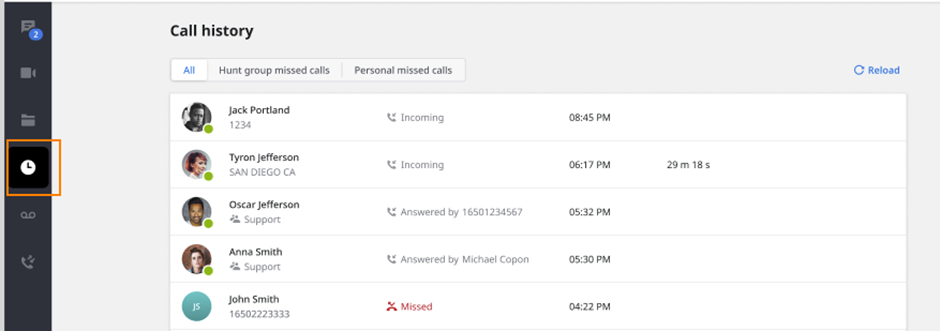
On this page, you can view All Calls or Missed Calls. You can switch the filter by clicking on the preferred option.
By hovering over one of the calls in the list, the following options will be available:
Call a listed contact or number by hovering the mouse on the Call button.
Report Spam: This functionality is aimed to allow end-users to help us improve categories and mark spam calls. Users can mark calls as SPAM, which will automatically send this phone number to our vendor. This is not meant to be a blocklist for phone numbers - it is feedback functionality only.
Block the number: After clicking this option, all future calls from a number you have configured to be blocked, then that call will immediately go to voicemail.

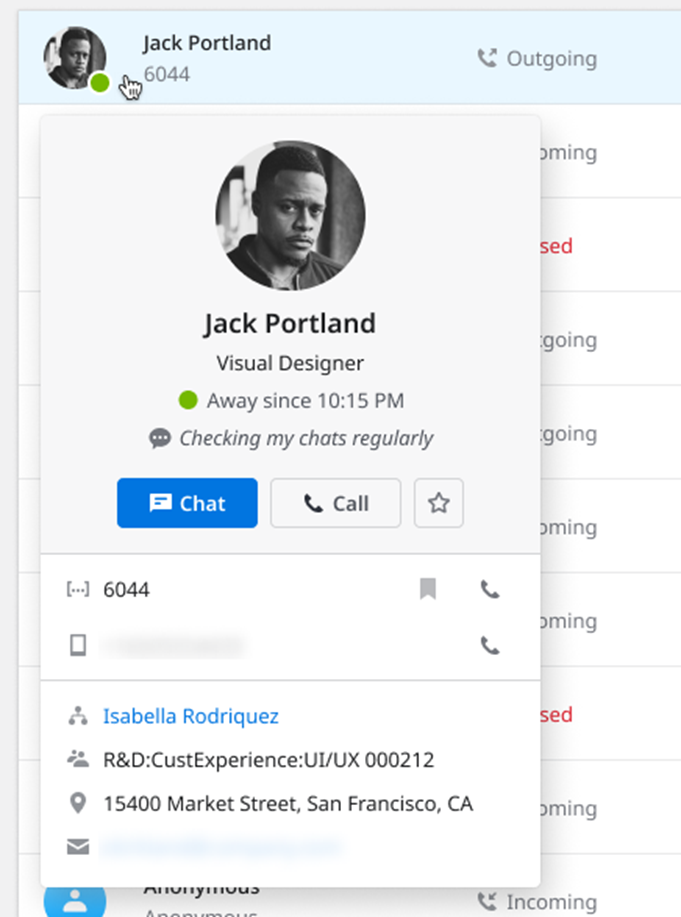
You can hover your mouse over the icon of a caller to see the additional contact information.
To create contacts from call history, follow the steps below:
Hover on the unknown contact
Click Create contact or Add to existing
Note: it's not possible to clear call history at the moment.