
Agents
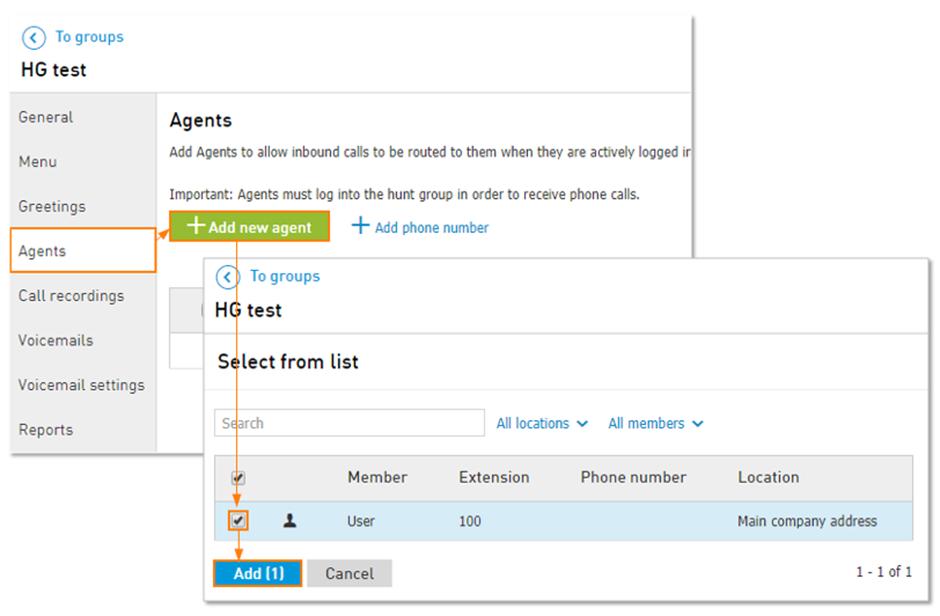
In order to add agents to the Hunt Group:
Click on Add new agent
Click the check mark next to the user(s) you would like to add.
Click the Add button.
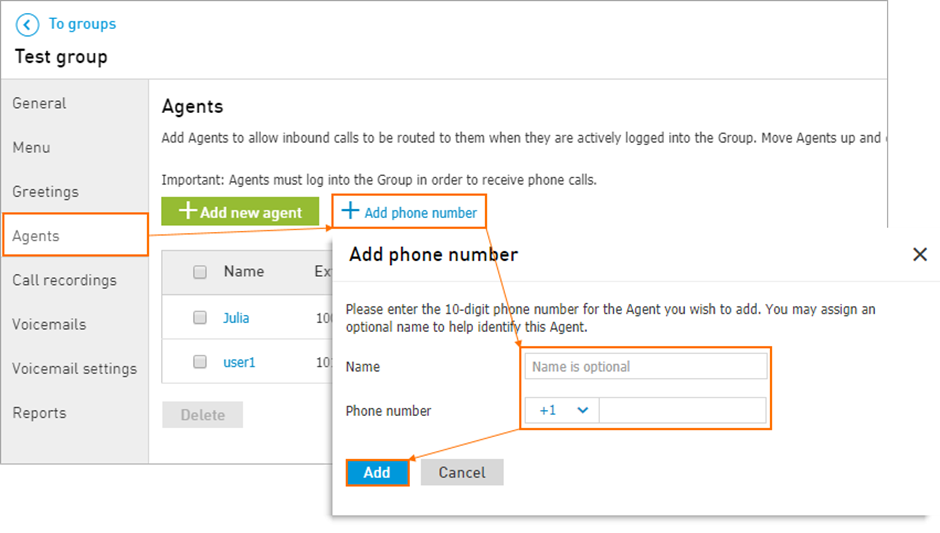
You can also add external phone numbers to Hunt Group:
Click Add phone number.
Enter name (optional).
Enter the 10 digit phone number.
Note: You can’t add a PSTN agent to a Hunt Group if the phone number already exists on the account. The existing phone number must belong to a user and that user must be assigned to the Hunt Group as an Agent.Click Add.
Note: if you add a cell phone number or any number that has an answering service, you must remember to properly adjust the Timeout setting under the Callers and Agents on the General tab.
Important: having the Hunt Group timeout longer than the answering service ring time will result in calls being picked up by the answering service before the next agent can receive the call.