
Auto Attendant Voicemail
With Elevate you can set up the Voicemail notifications for your Auto Attendant and listen to the Voicemail messages in your CONTROL PANEL.
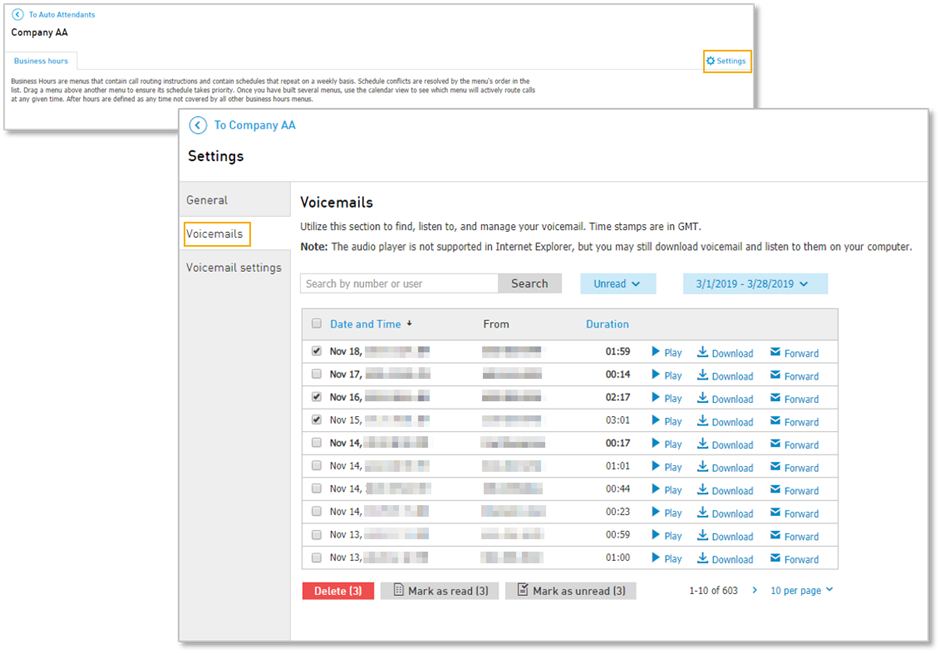
To set the Voicemail notifications, navigate to CONTROL PANEL: Services > Elevate > Auto Attendant > click on Auto Attendant Name > Settings > Voicemail settings > Enter the Email for voicemail. There, you can also upload a new greeting for your Auto Attendant voicemail, change the Voicemail PIN and adjust notification settings.
Under Voicemails tab, you will be able to see the Voicemail messages left for the Auto Attendant in question. Once a message is left, you can play, download, forward or delete it.
Note: Maximum storage for voicemail is 50 Mb regardless of storage time. You can change how long messages will be kept on the server before auto-deletion by navigating to Elevate > Settings > Voicemail settings.