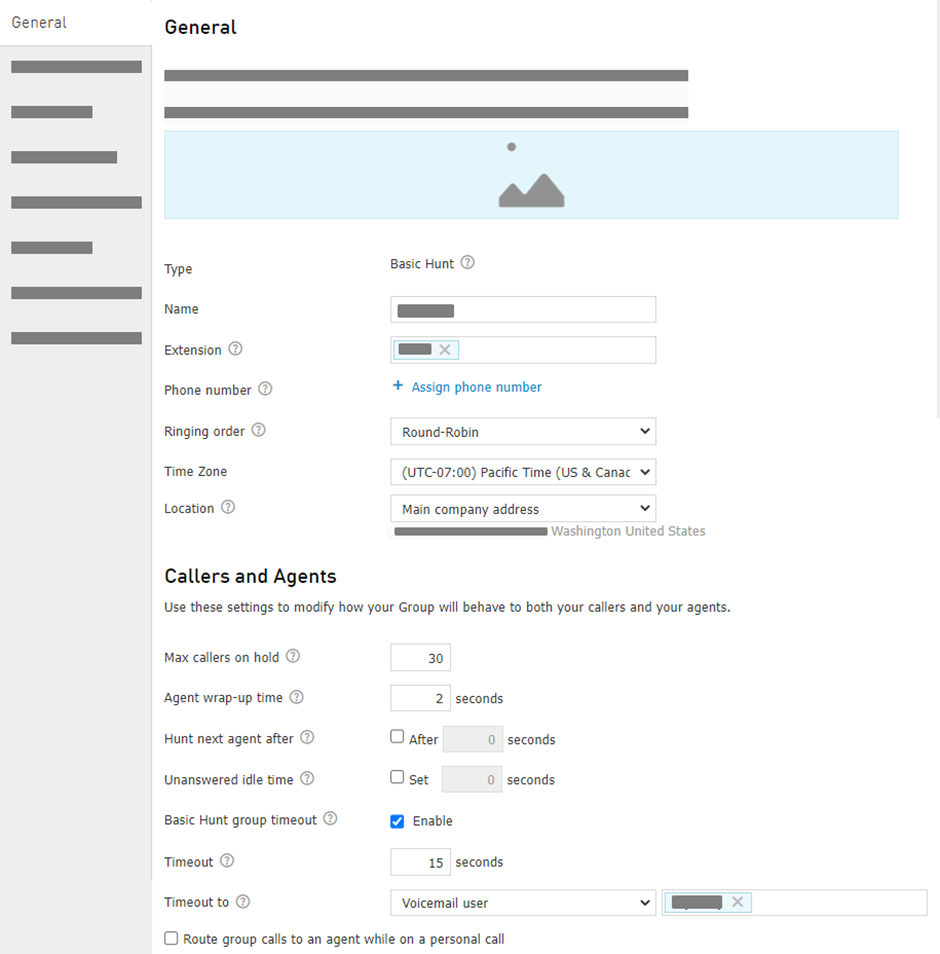
General
On the General Tab you can:
Change the Name.
Change the Extension
Assign new or unassign Phone Numbers.
Change the Ringing Order for agents assigned to the group.
Change the Time zone for the Hunt Group.
Change the Location for the Hunt Group.
Depending on Ringing order chosen, you can adjust the following under Callers and Agents:
Max callers on hold: The number of callers who may wait on hold for an agent to become available to take the phone call. When the max callers are holding, additional callers hear a message, which you can choose later under Greetings tab, then they are sent to the Basic Hunt Group timeout destination.
Note: The default value is 30, min — 1, max — 100.Agent wrap-up time: The number of seconds after an agent ends a phone call before the system routes the next incoming call to their phone. An agent is considered unavailable during this time. This allows the agent to make notes and prepare for the next call.
Important: If an agent is logged into 2 or more Hunt Groups, the wrap time will only be respected by (and known to) the Hunt Group through which the call was received. An agent in wrap status for the first Hunt Group can still receive calls from other Hunt Groups.Hunt next agent after: The period of time after which the call will be directed to the next agent of the Hunt Group.
Unanswered idle time: The period of time for an agent to be temporarily removed from the Hunt Group call routing if they do not answer a hunt group call.
Route group calls to an agent while on a personal call allows the agent to receive a second Hunt Group call if on an active call. Answering this call will place the first call on hold.
If Basic Hunt group timeout is enabled, the following settings become available:
Timeout: the timeout period in seconds before hunting calls are transferred to other destination
Timeout to: an alternate destination to route a phone call; the following options are possible:
Phone Number.
Phone number timeout in seconds: the period of time the external phone you specified above will ring before the call will be routed to Hunt Group voicemail. This option will only appear if timeout is set up to the external phone number.
Note: if you set a long timeout, a call may be 'picked up' by the voicemail of an external number. Make a test call to confirm the routing is working as expected.
User
Auto Attendant
Hunt Group
Voicemail user
Voicemail: current group
Voicemail box
Advanced Hunt Group
Note: If a hunt group is ringing the agent longer than his personal timeout is set to, it will stop ringing when the agent's timeout value is reached, generate a missed call, and start ringing again. This will keep happening until the hunt group timeout value is reached.