
Receiving calls as an agent
Once Agents are logged into the Group, any calls that are received will automatically begin ringing to their device in the order of the ring method chosen.
When the Elevate Desktop application is opened, the call bar will display the incoming call with the full Hunt Group name and CNAM:

When the Elevate Desktop application is minimised or not the focused application, the incoming call pop-up window will also display both the full Hunt Group name and CNAM of the caller:
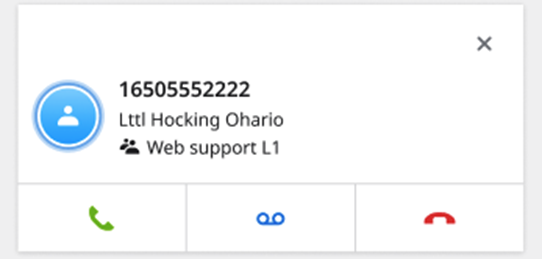
When receiving calls from hunt groups, the Caller ID is modified to append the group name to the end of the Caller ID name (or 'CNAM') field on the display of your phone, to allow agents to quickly identify where callers are being referred from; this is very useful for agents that fill multiple roles and are in 2 or more groups.
The Elevate system accomplishes this by:
Capturing the first 10 characters from the caller's original Caller ID name. (example: CNAM: ACMEWarehouse = ACMEWareho)
Capturing the first 10 character from the Hunt Group the call was received on. (example: Hunt Group Name: CustomerSupport = CustomerSu)
Add ',' between the entries
Inbound Caller ID Display Result: ACMEWareho, CustomerSu 6503551212