Verify Auto Attendant Setup
Make sure the structure is correct:
Verify the correct time zone is set (Services > Elevate > Auto Attendant > Edit Auto Attendant > Settings > General > Time Zone) because it will affect the Business/After Hours.
Make sure the extension and phone numbers are assigned as intended.
Make sure the email for Voice Mail is the one you want Voice Mail messages to be delivered to (Services > Elevate > Auto Attendant > Edit Auto Attendant > Settings > Voicemail settings).
Make sure your greeting explains each option that you have set up and which key caller needs to press for it.
We have a visual representation of the Auto Attendant settings for your convenience. The coloured graph on the main page of the Auto Attendant shows all active menus day-by-day along with their names and activity periods.
Auto Attendant Hold Music
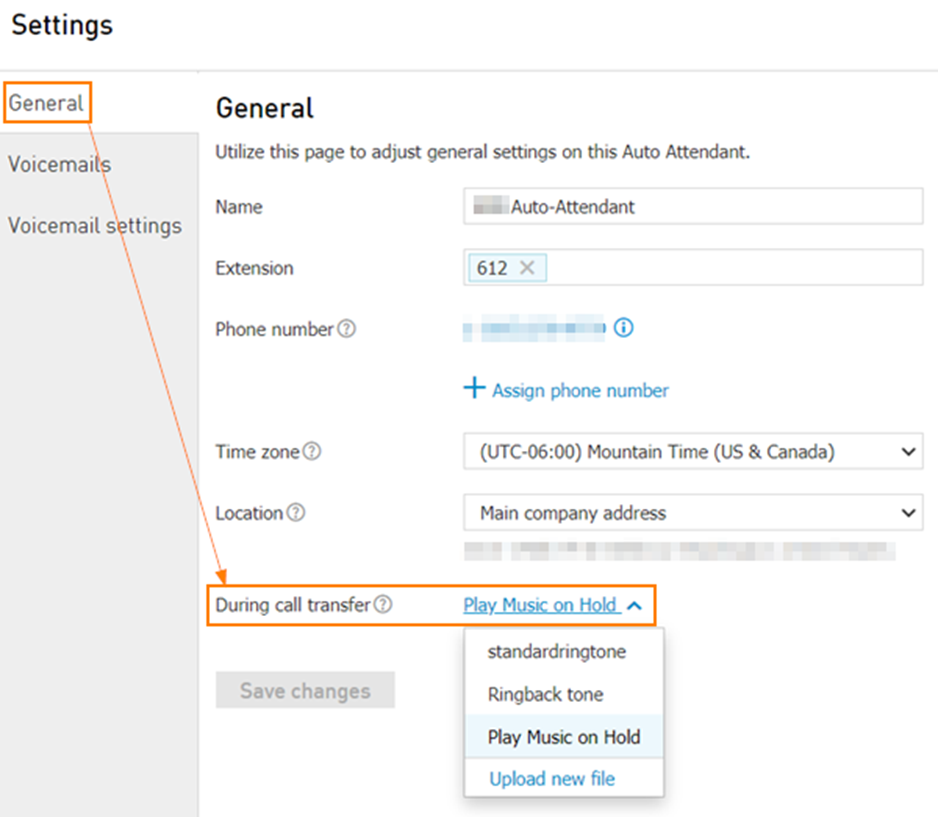
You can manage music played to the caller during the call transfer:
Services > Elevate > Auto Attendant > Edit Auto Attendant > Settings > General > During call transfer.